

Microsoft Teams Direct Routing SIP Trunk Guide for MSPs
Direct Routing connects your own SIP trunks to Microsoft Teams through a certified session border controller, giving MSPs the control over carrier, routing, and margin that Microsoft’s packaged options don’t offer.
- The architecture is four layers deep. Teams client, Teams Phone, a certified SBC, and your SIP trunk each carry a distinct job.
- Emergency calling is the compliance trap. Federal 911 dialing and dispatchable location rules apply, and roaming users complicate both.
- Multi-tenant SBC design is where the margin lives. Shared infrastructure changes the per-customer economics.
- Most deployments fail on preparation. Porting, certificate expirations, and firmware drift cause more outages than routing logic.
Treat your first deployment as a repeatable practice rather than a one-off project because the second and third customers should cost a fraction of the first.
Microsoft Teams is where business conversations already happen, which makes it the obvious place for the phone system to live too. Teams can’t reach the public telephone network on its own, and that gap is where partners earn their keep. A Microsoft Teams Direct Routing SIP trunk closes it by connecting Teams to carrier voice through infrastructure you control. Demand keeps climbing, with the SIP trunking market forecast to grow from $73.14 billion in 2025 to $85.07 billion in 2026. For MSPs already managing Microsoft 365 tenants, voice turns project work into a reseller-focused SIP practice.
What Is a Microsoft Teams Direct Routing SIP Trunk?
Direct Routing is Microsoft’s supported method for connecting third-party carrier voice to Teams Phone through a session border controller you or your provider operates. The Microsoft Teams Direct Routing SIP trunk is the carrier leg, carrying calls between the PSTN and the SBC.
Four components carry every call. The Teams client is where the user dials and answers. Teams Phone provides the cloud PBX functions, including call control, voicemail, auto attendants, and call queues. The SBC sits at the boundary, translating SIP signaling between Microsoft’s cloud and your carrier while enforcing security policy. Your provider delivers the numbers and minutes.
Outbound calls travel from the Teams client into Teams Phone, out to the SBC, and onto the carrier network. Inbound calls reverse that path. Because the carrier leg is yours, you set the rates and decide how calls are routed.
Teams Phone vs. Direct Routing: Which PSTN Option Fits Your Customer?
Microsoft offers three ways to add calling to Teams, so the Teams Phone vs. Direct Routing question is really a three-way decision. Calling Plans make Microsoft the carrier, Operator Connect brings in a pre-approved operator managed from the Teams admin center, and Direct Routing lets you bring your own carrier and SBC.
| Factor | Calling Plans | Operator Connect | Direct Routing |
| Who is the carrier | Microsoft | Microsoft-approved operator | Any carrier you choose |
| Certified SBC required | No | No | Yes |
| Typical deployment time | Days | Days | Weeks |
| Technical complexity | Low | Low | Moderate to high |
| Routing customization | Minimal | Limited | Extensive |
| Partner margin control | None | Limited | Full |
| Supports legacy endpoints | No | No | Yes |
When Does Operator Connect Make More Sense?
Operator Connect suits customers who want Teams calling live quickly and have no appetite for infrastructure. Provisioning happens in the Teams admin center, and nobody thinks about certificates or firmware. The tradeoff is that the customer contracts with the operator directly, removing you from the billing relationship. It’s also weaker when the customer runs anything besides Teams, since contact center platforms, paging systems, elevator lines, and legacy extensions all need somewhere to terminate.
Why Do Most MSPs Land on Direct Routing?
Microsoft Teams Direct Routing with SIP trunking keeps the carrier layer separate from the application layer, which matters more over time than on day one. When a customer adds a contact center or keeps analog lines for a warehouse, the SBC absorbs that without a carrier change. The commercial case is just as direct: you buy trunks wholesale, price the service, and invoice alongside other managed services. That’s margin you control rather than a referral fee.
How Should You Design a Microsoft Teams Direct Routing SIP Trunk Deployment?
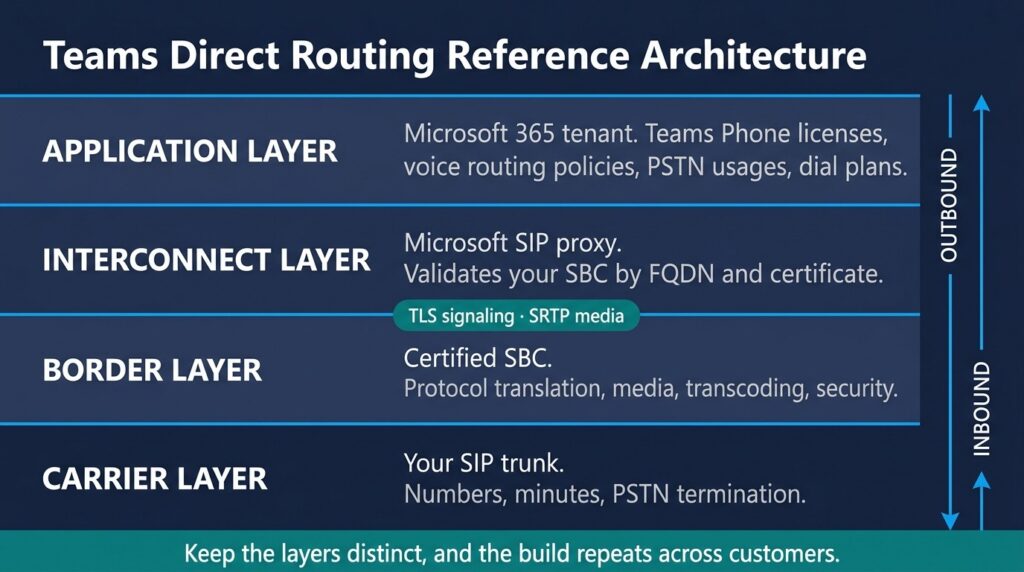
A well-designed deployment is separated into four layers, and keeping them distinct makes the build repeatable across customers.
The application layer is the customer’s Microsoft 365 tenant: Teams Phone licenses, voice routing policies, PSTN usages, voice routes, and dial plans. The interconnect layer is Microsoft’s SIP proxy, which validates your SBC by fully qualified domain name and certificate. The border layer is the SBC itself, handling protocol translation, media, transcoding, and security. The carrier layer is your SIP trunk, terminating to the PSTN. Signaling to Microsoft rides TLS, and media rides SRTP.
Confirming which certified platform compatibility exists on your trunking side saves rework because not every carrier handles Teams signaling identically.
What Are the Certified Session Border Controller Requirements?
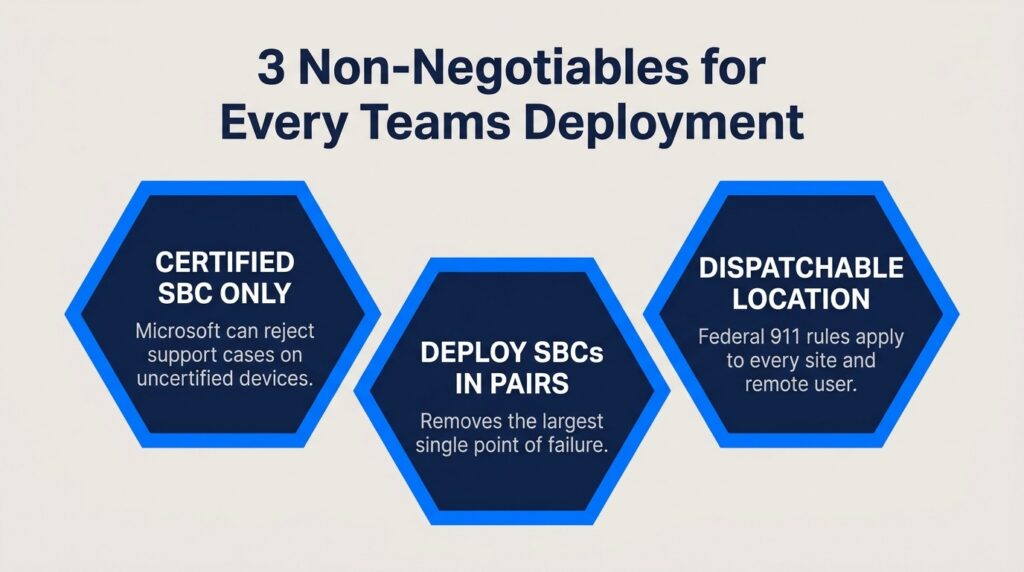
Microsoft supports Direct Routing only when the session border controller appears on its certified list and reserves the right to reject support cases involving non-certified devices. Certification is granted to specific firmware versions, so an SBC compliant at install can drift out of support after an upgrade.
Every certified session border controller needs the same foundation: a public IP address, a fully qualified domain name registered in the customer’s tenant, and a valid TLS certificate from a Certificate Authority Microsoft trusts. Firewall rules must permit SIP signaling and media to Microsoft’s PSTN hub endpoints. The Microsoft-certified SBC list names AudioCodes, Ribbon, and Oracle, among others, and verifying AudioCodes SBC compatibility with your trunk provider is worth the 10 minutes.
Should You Deploy a Dedicated or Multi-Tenant SBC?
A dedicated SBC per customer is simpler to reason about and easier to hand off if the relationship ends. It also means a separate license, certificate, and patching cycle per account, which doesn’t scale past a handful of customers. A multi-tenant SBC changes the arithmetic, since one platform serves many tenants isolated by subdomain and routing configuration. Most partners who commit to voice end up here because it’s the only design where the tenth deployment costs less than the first one.
How Do You Handle Number Porting for a SIP Trunk for Microsoft Teams?
Porting is where schedules slip for administrative reasons rather than technical ones. Start the letter of authorization before you touch any configuration, since a rejected LOA over a mismatched service address costs two weeks.
Order the current carrier bill and match the billing name, address, and account number character for character. Request the full number inventory rather than the numbers the customer remembers, since alarm lines, fax numbers, and forgotten DIDs always surface at a bad moment. Provision temporary numbers on the SIP trunk for Microsoft Teams so you can validate call flow, emergency routing, and caller ID before the port date.
What Are the Emergency Calling Requirements for a Teams Voice Deployment?
Emergency calling is the part of a Teams voice deployment most likely to create liability, and two federal rules govern it. Kari’s Law requires multi-line telephone systems to allow direct 911 dialing without a prefix digit and to notify a designated person when a 911 call is placed. Section 506 of RAY BAUM’S Act requires a dispatchable location with the call, including a validated street address plus the suite, floor, or room detail needed to find the caller. Both are documented in the FCC rules for multi-line systems.
Teams complicates this requirement because users move. A softphone in the Cleveland office this morning may be at a kitchen table this afternoon, and the address on file won’t follow it. Teams supports dynamic emergency addressing that maps subnets, wireless access points, and switch ports to civic addresses, covering users inside managed locations. For remote users, you need a documented process for updating addresses and written acknowledgment from the customer about who owns it.
How Do You Design Multi-Location Teams Calling?
Multi-location Teams calling works through routing logic rather than infrastructure at every site. A single SBC pair can serve every location a customer operates, with site identity carried through tenant dial plans and voice routing policies.

Build a dial plan per site so extension dialing and local number formats behave the way users expect. Assign PSTN usages that present the correct local caller ID for each office, since a Phoenix branch calling out with a Chicago number hurts answer rates. Where a site has poor connectivity, evaluate whether a local SBC or Survivable Branch Appliance is warranted before promising uptime. Estimate concurrent call volume per site, and confirm that the circuit and QoS policy support the peak.
Building Redundancy and Security Into the Deployment
Voice failures are visible in a way other outages aren’t, and toll fraud is hard to explain after the fact. Seven measures belong in every build:
- Deploy SBCs in pairs. Microsoft supports multiple SBCs per tenant with priority weighting, which removes the largest single failure point.
- Use carrier diversity where risk justifies it. A second trunk on a separate network covers incidents that SBC redundancy won’t.
- Configure failover voice routes. Secondary routes in the tenant reroute calls automatically instead of waiting for someone to notice.
- Enforce TLS and SRTP end to end. Encrypted signaling and media should be the default on both legs.
- Restrict signaling by IP allowlist. Accept SIP traffic only from Microsoft’s published endpoints and your carrier’s addresses.
- Set spend and destination thresholds. Caps on high-cost destinations stop fraud at hundreds of dollars rather than thousands.
- Monitor SBC health actively. Certificate expiration, firmware currency, and SIP OPTIONS response belong on your dashboard.
Partners who build this into a standard template rather than a per-customer decision see far fewer escalations, which is why a structured SIP trunk reseller program with predictable behavior matters more than headline rates.
Seven Deployment Mistakes That Cost MSPs Time and Margin
These failures account for most of the trouble partners hit on early builds, and every one is preventable during planning.
Treating the SBC as a set-and-forget appliance. Certificates typically expire at 12 months, and an expired one takes the trunk down completely.
Starting configuration before the LOA is accepted. Porting rejections are administrative and slow. Get the paperwork moving first.
Skipping the emergency calling design session. Retrofitting a dispatchable location across a live tenant is far harder than building it in.
Assuming media bypass will work everywhere. It reduces latency by keeping media off Microsoft’s path, but it depends on network conditions and firmware. Validate it.
Under-provisioning the pilot. A five-user pilot rarely surfaces what a 50-user cutover will. Use enough concurrency to stress the design.
Leaving legacy endpoints unaccounted for. Elevator phones, fire panels, fax lines, and paging systems don’t live in Teams. Inventory them at discovery.
Pricing on cost rather than value. You’re delivering design, compliance, and support, and the price should reflect all three.
Implementation Checklist for Your First Direct Routing Deployment
Work these phases in order. Discovery: number inventory, current carrier and contract dates, site list with civic addresses, legacy endpoint inventory, and Teams Phone license verification. Design: SBC model and deployment mode, dedicated or multi-tenant, dial plan structure, PSTN usages per site, emergency addressing map, and failover routing.
Build: SBC provisioning, FQDN registration, certificate installation, firewall rules, carrier-side trunk configuration, and voice routing policies. Validation: test calls both directions, caller ID per site, emergency call testing, notification confirmation, and failover simulation. Cutover: pilot port, soak period, full port, legacy disconnection, and documentation handoff.
Frequently Asked Questions
Do I need my own SBC to offer Teams Direct Routing? You need a certified SBC in the path, but not hardware you own. Cloud-hosted and provider-supplied options exist, though operating your own gives more control over routing and more margin.
Can Direct Routing and Calling Plans run in the same tenant? Yes. Microsoft supports mixed deployments, and users can be assigned individually, which helps when a few sit where your carrier doesn’t serve well.
How long does a typical Direct Routing deployment take? Plan on three to six weeks for a first deployment, with porting driving most of the timeline. Later deployments on the same SBC often finish in one to two weeks.
What happens to Teams calling if the SBC goes offline? Teams-to-Teams calls continue because they never touch the SBC. PSTN calling stops unless you’ve configured a secondary SBC and failover voice routes.
Does Microsoft Teams Direct Routing SIP trunking support call recording and contact center integration? Yes, and it’s a common reason customers choose it. Because the media path runs through infrastructure you control, third-party platforms integrate more readily.
Turning Teams Deployments Into Recurring Revenue
Direct Routing rewards partners who treat it as a practice rather than a favor for one customer. The first deployment teaches you porting, the certificate lifecycle, and the emergency calling workflow. The fifth runs on templates, and the margin flows straight to your bottom line. Pairing that maturity with a deliberate approach to building recurring telecom revenue separates partners who dabble in voice from those who build a durable book.
The connectivity layer underneath all of it should be the part you think about least. SIPTRUNK gives resellers wholesale SIP trunking on Tier-1 networks with no contracts, no upfront costs, and a provisioning platform built for partners managing many customers at once. Get started with SIPTRUNK to add Teams voice to your catalog and build your first deployment on a platform designed for the way you sell.

Mitch leads the Sales team at BCM One, overseeing revenue growth through cloud voice services across brands like SIPTRUNK, SIP.US, and Flowroute. With a focus on partner enablement and customer success, he helps businesses identify the right communication solutions within BCM One’s extensive portfolio. Mitch brings years of experience in channel sales and cloud-based telecom to every conversation.